

Image Image Image Image Image Image Image Image Image

Social Media Marketing for Business

Heyo Blog - Social Media Marketing for Businesses

Heyo

By

October 9, 2026

Looking for a Manychat Alternative? Meet Heyo.

October 9, 2026 | By | No Comments">No Comments

Heyo as a Manychat alternative for Instagram and TikTok messaging automation, featuring an AI builder, templates and automated guide delivery.Looking for a Manychat alternative to automate your Instagram and TikTok messages without making setup a project of its own? Meet the all-new Heyo.

Whether you’re sharing a guide, recommending a product or delivering a discount code, the goal is simple: give interested followers an easy next step.

Heyo is built to make that happen. Start with a ready-made template or tell the AI builder what you want to accomplish. Customize your messages, review the conversation and get ready to connect with your audience.

Simple setup. Affordable plans. More opportunities to turn social interest into engagement, leads and customers.

When You Want Automation Without the Extra Complexity

Manychat is an established option for social messaging automation. But if you’re looking for a simpler way to handle your everyday Instagram and TikTok campaigns, Heyo offers a focused alternative.

As a creator, you might want to:

  • Send a guide or download someone requested.
  • Share a product link or discount code.
  • Capture email signups or build a launch waitlist.
  • Run a giveaway, instant win or rewards campaign.

Heyo is designed around those goals, with templates and an AI builder that help you get started without building every conversation from scratch.

You have content to create and an audience to engage. Setting up your messaging shouldn’t take over your day.

Heyo vs. Manychat: A Quick Comparison

Both Heyo and Manychat offer templates and AI-assisted automation building. Heyo’s focus is bringing those tools together in an approachable experience for everyday creator campaigns.

What matters to creators Heyo Manychat
Platform focus Instagram and TikTok at launch Instagram, TikTok and additional channels, depending on plan
Getting started Choose a goal-based template or describe your idea to the AI builder Choose a template, use the visual Flow Builder or work with an AI Flow Builder assistant
Product approach A focused experience designed around everyday creator campaigns A broader platform for varied marketing, messaging and team needs
Content and lead capture Share guides, product links and offers; capture leads and waitlist signups Content delivery and lead capture, alongside broader marketing tools
Audience promotions Tools for coupons, giveaways, instant wins and rewards Promotion options depend on the experience you want to build
Free plan Planned for public beta Available
Starting paid price Planned $9/month with annual billing $14/month with annual billing for Essential
Availability Public beta opens soon Available now

Heyo pricing and features reflect public-beta launch plans. Manychat information was checked in October 2026 using its pricing page and AI Flow Builder documentation. Prices are monthly equivalents with annual billing; features and usage limits differ.

Heyo Instagram DM automation showing a LINK comment triggering an automatic direct message

Start With a Template. Make It Yours.

You don’t need to begin with a blank canvas.

Choose a Heyo template for what you want to accomplish, then add your content, links and messages. A guide delivery, product recommendation or waitlist signup gives you a practical starting point you can customize for your audience.

Make the greeting sound like you. Explain what people will receive. Give them a clear next step.

The template handles the starting structure so you can focus on the conversation.

Tell the AI Builder What You Want to Happen

Have an idea in mind? Describe it in plain language.

For example:

“Help me send my guide to people who comment GUIDE on my Instagram Reel.”

Heyo’s AI builder turns that request into a conversation flow you can review and customize. Add your guide link, adjust the wording and check the steps before activating it.

You bring the idea and your voice. Heyo helps you put the automation together.

For creators juggling filming, editing, posting and partnerships, that means less time on setup and more time creating.

Instagram and TikTok, With the Right Flow for Each

Heyo supports messaging automation on both Instagram and TikTok, with experiences built around how each platform works.

On Instagram, a keyword comment on a post or Reel can trigger a private message. The person taps a reply button to continue and receive the requested link, guide or offer.

Your caption could say:

“Comment GUIDE and I’ll send you my free workout plan.”

On TikTok, viewers can start the conversation by sending your account a DM. Heyo can also respond to a keyword comment on a selected video with a public reply inviting the viewer to message you. That comment does not directly trigger a private DM.

Your TikTok call to action could say:

“DM me GUIDE for my free workout plan.”

That gives you clear calls to action for each channel—and a way to follow through when someone shows interest.

Go Beyond Sending a Link

A useful conversation can do more than deliver content.

Someone requesting a guide might also want to join your email list. A follower interested in an upcoming course might sign up for your waitlist. A customer asking about an offer might receive a unique coupon.

Heyo brings lead capture, coupons, giveaways, instant wins and rewards into those conversations, giving you more ways to encourage participation and keep people engaged.

For a fitness creator, that could mean sharing a workout guide and collecting signups for a new program. For a beauty creator, it could mean delivering a product link and discount code. For an educator, it could mean building a waitlist for the next course.

Use messaging to grow your email list, support a launch, reward your audience or help an interested follower become a customer.

Affordable Automation for Creators

Cost matters, especially when you’re adding another tool to your monthly budget.

Heyo plans to launch with a free plan and paid options starting at $9 per month when billed annually, giving you a way to start small and choose a plan that fits your needs.

When comparing Heyo with Manychat, look beyond the starting price. Compare the features, usage limits and billing terms for the campaigns you actually want to run.

The goal is to find a plan that delivers value for your creator business and makes sense as your audience grows.

Is Heyo the Right Manychat Alternative for You?

Heyo is built for creators who want an easy way to put Instagram and TikTok messaging automation to work.

If you want ready-made templates, an AI builder, affordable plans and practical tools for engagement and lead capture, Heyo is built with you in mind.

If you need additional messaging channels or a broader set of marketing and team tools, Manychat may be a better fit.

Choose the platform that fits what you want to accomplish – and how much time you want to spend managing it.

Frequently Asked Questions

Is Heyo a Manychat alternative for creators?

Yes. Heyo is built for creators who want a simpler way to automate Instagram and TikTok conversations. Templates and an AI builder help you set up content delivery, product recommendations, lead capture and audience promotions.

Why choose Heyo instead of Manychat?

Heyo is designed for creators who want a focused, easy-to-use experience for Instagram and TikTok campaigns. Its approach brings templates, an AI builder and promotion tools together to help you turn an idea into an automated conversation.

Does Heyo have a free plan?

Heyo plans to offer a free plan when public beta opens, alongside affordable paid options. Full features and usage limits will be available at launch.

Is Heyo cheaper than Manychat?

Heyo’s planned paid pricing starts at $9 per month with annual billing, compared with Manychat Essential’s current starting price of $14 per month with annual billing. These are starting-price comparisons; included features and usage limits differ.

Does Heyo support Instagram comment-to-DM automation?

Yes. A keyword comment on an Instagram post or Reel can trigger an initial private message. The recipient taps a reply button to continue and receive the requested guide, link or offer.

How does Heyo’s TikTok automation work?

Viewers can start an automated conversation by sending your account a DM. Heyo can also publicly reply to a keyword comment on a selected video, inviting the viewer to message you. That comment does not directly trigger a private DM.

Do I need to build an automation from scratch?

No. Choose a ready-made template or describe your goal to Heyo’s AI builder. Then customize the messages, add your content and review the conversation.

When can I try Heyo?

Public beta opens soon. Join the early-access list to receive launch updates and be among the first to try it.

Turn Social Interest Into Your Next Opportunity

You work hard to create content people care about. Heyo helps you follow through when they ask for more.

With templates, an AI builder and affordable plans, the all-new Heyo is designed to make Instagram and TikTok messaging automation easier for creators.

Public beta opens soon. Join Heyo’s early-access list and be among the first to try it.

Heyo

By

October 7, 2026

Instagram Comment-to-DM Automation: How It Works

October 7, 2026 | By | No Comments">No Comments

Instagram comment-to-DM automation showing an Instagram LINK comment triggering an automatic DM with a product linkSometimes the best call to action is just one word.

GUIDE. LINK. DEAL.

Someone comments it on your Instagram post or Reel, and that comment can trigger a private reply in their DMs.

That’s Instagram comment-to-DM automation.

When someone comments because they want a product link, guide, coupon or other information, they’re asking for a next step. Comment-to-DM automation gives you a way to respond right away without manually working through comments and sending the same messages one by one.

But setting it up means understanding what happens between the comment and the DM. Instagram has specific rules for how that first private message works and what can happen next.

What Is Instagram Comment-to-DM Automation?

Instagram comment-to-DM automation turns a comment on your Post or Reel into the start of a DM conversation.

You choose which comments trigger a message. It could be a specific word, several keywords or another supported comment condition. When a matching comment comes in, the first DM is sent automatically.

For example, a Reel offering a downloadable guide could invite people to comment GUIDE. A product post could use LINK or DEAL. Depending on how the automation is set up, a specific keyword may not be required. 

That means you can move someone from the comments into a direct conversation while their interest is fresh, without manually responding to each person.

To use comment-to-DM automation, you need an Instagram professional account (Business or Creator).

Instagram comment-to-DM automation flow showing a comment triggering an automatic DM, user interaction and follow-up messages

How Does Instagram Comment-to-DM Automation Work?

It starts with the comment.

When a comment matches the trigger you’ve set, the automation sends the person a DM. That first message can deliver what they asked for, such as a guide, product link or coupon, or give them another next step.

Instagram treats this first message differently from an ongoing DM conversation. If you want the automation to continue sending additional messages, the person needs to respond or take another eligible action in that first DM. 

The basic flow looks like this:

Comment → First DM → Person interacts → Conversation continues

Instagram also places limits on that first message. It allows one Private Reply per comment, which must be sent within seven days of the comment. The seven-day limit applies to the comment itself, not the age of the Post or Reel, so older content can still trigger a new message when someone leaves a new qualifying comment.

What Happens After the Automatic Instagram DM?

Receiving the first DM doesn’t automatically open an ongoing messaging window.

When the person responds or takes another eligible action in the message, Instagram’s 24-hour messaging window can open. During that time, the automation can continue the conversation with additional messages. 

A new eligible interaction can restart the 24-hour messaging window. 

Where Does Comment-to-DM Work on Instagram?

With Heyo, Instagram comment-to-DM automation works on Posts and Reels from professional accounts (Business or Creator).

The Post or Reel doesn’t have to be new. An existing piece of content can still trigger the automation when someone leaves a new qualifying comment.

That means content that continues to get attention can keep turning new comments into DM conversations long after it was originally published.

How to Set Up Instagram Comment-to-DM Automation

To set up Instagram comment-to-DM automation, connect an Instagram professional account (Business or Creator), choose the Post or Reel you want to use, set the comment trigger, create the first DM and test the complete flow.

  1. Connect your Instagram professional account. Comment-to-DM automation requires a Business or Creator account with the necessary permissions for comments and messaging.
  2. Choose the Post or Reel. Select the Instagram content where you want the comment-to-DM automation to run.
  3. Set the comment trigger. Choose which comments should trigger the DM. You might use a specific keyword such as GUIDE or another comment trigger supported by your automation platform.
  4. Create the first DM. Decide what someone should receive when their comment triggers the automation. The first DM can include a guide, product link, coupon or other content they requested.
  5. Set up what happens next. If you want the automated conversation to continue, give the person an eligible way to respond or take another action in the first DM. That can open Instagram’s 24-hour messaging window, allowing additional automated messages to follow. 
  6. Test the complete flow. Leave a qualifying comment and confirm that the correct DM arrives, the link or content works and any follow-up messages work as intended.

Ways to Use Instagram Comment-to-DM Automation

Instagram comment-to-DM automation can help turn interest in a Post or Reel into an immediate next step. The comment someone leaves can determine what they receive in the first DM.

Share product links. Feature an outfit, product or collection and invite people to comment OUTFIT, LINK or DEAL to receive the relevant link.

Deliver guides and downloads. Offer a resource connected to the content and use a keyword such as GUIDE to send it directly in the first DM.

Send coupons and offers. Ask people to comment DEAL, DISCOUNT or another keyword to receive a coupon, discount or special offer.

Share recipes, tutorials or additional content. A Post or Reel can show part of the content, while a comment such as RECIPE or HOW TO triggers the complete resource.

Drive registrations and waitlists. Use the DM to send information or a link for an event, class, launch or waitlist.

The trigger doesn’t have to feel like an automation command. Choose a word that fits naturally with the content and makes the next step clear.

Instead of asking someone to leave Instagram, search your bio or wait for a manual response, comment-to-DM can put what they asked for directly into the conversation.

Build Instagram Comment-to-DM Automation With Heyo

Heyo has an AI builder that creates the automation for you.

Describe what you want to happen:

“When someone comments GUIDE on this Reel, send them the guide.”

Heyo creates the flow, connecting the comment trigger to the DM and setting up what happens next. You can see the full flow, make changes and customize the messages before it goes live.

Want LINK to send a product link or DEAL to send an offer? Describe the outcome. Heyo builds the automation around it.

No need to map out the automation before you begin. Just tell Heyo what you want it to do.

Instagram Comment-to-DM Automation FAQs

What is Instagram comment-to-DM automation?

Instagram comment-to-DM automation automatically sends a DM when someone leaves a qualifying comment on an Instagram Post or Reel. Brands and creators can use it to send product links, guides, coupons, offers and other requested content without manually responding to each comment.

Can you automatically DM someone who comments on Instagram?

Yes. With Instagram comment-to-DM automation, a qualifying comment on a Post or Reel can trigger an automatic DM. You need an Instagram professional account, either Business or Creator, connected to a supported automation platform.

Does someone have to respond to the first Instagram DM? 

The first DM can deliver the guide, link, coupon or other content the person requested without requiring another message first. However, receiving the first DM does not by itself open Instagram’s 24-hour messaging window. To continue with additional automated messages, the person needs to respond or take another eligible action in the message. 

How long after an Instagram comment can an automatic DM be sent?

Instagram allows the first private reply to a comment to be sent within seven days of the comment. The limit applies to when the comment was posted, not when the original Post or Reel was published. This means an older Post or Reel can still trigger an automatic DM when it receives a new qualifying comment.

Heyo

By

October 6, 2026

Instagram DM Automation: From Comments to Action

October 6, 2026 | By | No Comments">No Comments

Instagram DM automation showing a LINK comment triggering an automatic Instagram DMSomeone comments LINK on your Reel. Someone else wants the guide you mentioned. Another person asks where to find the product. And every one of those comments needs a response.

That can mean checking comments, replying to people, opening DMs, sending links, and answering the same requests again and again. The more engagement your content gets, the more there is to keep up with.

Instagram DM automation can handle that work for you.

Instead of manually responding every time someone asks for something, you can set up an automation that recognizes the right comment and starts the conversation in DMs. Someone comments GUIDE, for example, and Heyo can send a private message automatically. From there, they can tap to get the guide, product link, coupon, or whatever you promised.

And sending a link is only the beginning. Instagram DM automation can help turn the interest your content is already generating into conversations and next steps without requiring you to manage every interaction yourself.

So what exactly is Instagram DM automation, and what can you do with it?

What Is Instagram DM Automation?

Instagram DM automation is a way to automatically start and manage conversations in Instagram DMs when someone interacts with your content.

Instead of seeing a comment and then manually sending that person a message, you can set up an automation to respond for you. For example, ask people to comment GUIDE on a post or Reel, and that comment can trigger a private DM. The person can then interact with the message to get the guide, link, coupon, or other information they asked for.

The conversation can continue from there based on how they respond, with additional messages, questions, links, and next steps.

That gives a single comment a lot more potential. Instagram DM automation can help deliver content, promote products, capture leads, build waitlists, send offers, and support giveaways. 

You decide what starts the conversation and what happens next. The automation handles the repeatable steps in between.

So how does it know when to respond? That starts with a trigger.

Why Use Instagram DM Automation?

Interest on Instagram can happen fast. Someone sees a Reel or post, wants the product, guide, offer, or information you mentioned, and is ready to take the next step.

The more work they have to do to get it, the easier it is to lose that moment. Finding the link in bio, searching your website, waiting for a reply, or remembering to come back later all add extra steps.

Instagram DM automation makes that path shorter. Someone can show interest with a comment and start the next step right from the content that caught their attention.

And you don’t have to be there waiting for the comment. The automation can start the conversation while the interest is fresh, whether one person responds or hundreds do.

That’s the real opportunity: turning more of the attention your Instagram content is already generating into action.

How Does Instagram DM Automation Work?

Instagram DM automation is built around two things: a trigger and a flow.

The trigger is what starts the automation. You might ask people to comment SHOP on a Reel to get the product link.

The flow is what happens after they comment. A private message starts the conversation, then guides them to the link, information, or next step you want to share.

The flow can be short and focused on delivering a link, or continue with more messages, questions, and options. 

You set the trigger and decide where the conversation should go. The automation handles the steps in between.

Heyo social media automation for sending links, running giveaways and sharing rewards through automated DMs

What Can You Do With Instagram DM Automation?

Instagram DM automation can do a lot more than send a link. You can use it to share content, promote products, collect leads, send offers, build waitlists, support giveaways, and more.

Send Links and Content

Give people what they came for. A comment can start a conversation that leads to a product page, guide, recipe, article, registration page, download, or other content without sending them off to hunt for it.

Capture Leads and Grow Your Email List

A request for a guide, coupon, giveaway information, or other content can also lead to an email signup. Give people the option to share their email address in the conversation, turning Instagram engagement into a permission-based contact you can reach outside the platform.

Promote Products

Turn product interest into a next step while it’s fresh. A product post or Reel can lead into a DM flow with the product link, more information, an offer, or another relevant action.

That can work for launches, recommendations, featured products, limited releases, and other product-focused content.

Build a Waitlist

Not ready to launch yet? Use the conversation to capture interest now.

A comment on a launch post can lead into a waitlist signup, giving interested followers a direct path to raise their hands without searching for a separate signup page.

Send Coupons and Offers

A comment can also start a flow that delivers a coupon, promotional code, or special offer. Someone sees the offer, responds to the content, and gets what they need in the conversation.

Support Giveaways and Rewards

Instagram DM automation can support giveaways, sweepstakes, and contests by continuing the experience after someone engages with the promotional content.

The flow could provide promotion information, direct someone to an entry experience, collect information where appropriate, or deliver a reward or next step. How the automation is used depends on the structure of the promotion.

Answer FAQs and Repeat Requests

When people regularly ask for the same information, automation can handle those repeat requests. Product details, links, availability, event information, and other common questions can be built into the flow, while conversations that need a personal response can still go to a person.

How AI Changes Instagram DM Automation

Building an Instagram DM automation can mean setting up the trigger, writing the messages, deciding what happens next, and connecting each step into a flow.

With Heyo, you don’t have to build every step yourself.

Tell Heyo what you want the automation to do:

“When someone comments LINK, send them my product link.”

Or:

“When someone comments GUIDE, send them my guide and ask for their email.”

Heyo uses your instructions to build the flow for you. You can preview how it works, edit the messages and steps, and make it yours before it goes live.

You bring the idea. Heyo turns it into a working automation.

Instagram DM Automation FAQs

Can Instagram DM automation capture leads and collect email addresses?

Yes. Instagram DM automation can be used for lead generation and email collection. For example, someone who comments to request a guide, coupon, offer, or waitlist can move into an automated DM conversation where they can be asked to provide an email address.

If you collect personal information, include the appropriate disclosures and obtain any permissions required for how you plan to use that information.

Can Instagram DM automation be used for giveaways?

Yes. Instagram DM automation can support Instagram giveaways, sweepstakes, and contests. An automated DM flow can provide promotion information, direct someone to an entry experience, collect information when appropriate, or continue the promotion experience after someone engages with a post or Reel.

DM automation does not replace the requirements of the promotion itself. Sweepstakes and contests still need appropriate official rules and must comply with applicable laws and Instagram’s current promotion requirements.

How can creators use Instagram DM automation?

Creators can use Instagram DM automation to automatically respond when someone leaves a specified comment on a post or Reel. That comment can start a private DM conversation that helps the person get a link, guide, product information, coupon, offer, giveaway information, or another next step.

This gives creators a way to turn interest in their Instagram content into direct conversations without manually responding to every request.

Do you need a Business or Creator account for Instagram DM automation?

Yes. Instagram DM automation through third-party platforms requires an Instagram professional account, which means a Business or Creator account. Personal Instagram accounts aren’t eligible for these integrations.

Heyo

By

October 5, 2026

TikTok DM Automation: The Complete Guide

October 5, 2026 | By | No Comments">No Comments

TikTok DM automation guide showing a TikTok creator and automated DM response triggered by the GUIDE keywordCongrats! Your TikTok worked. Someone wants what you just shared. Now make the next step easy.

Ask them to DM you a word like GUIDE, LINK, DISCOUNT or SHOP, and TikTok DM automation can take it from there. The viewer starts the conversation, and the right response is ready for them, whether that’s a product link, a download, an offer, an answer, or something else they came for.

No watching your inbox for the same requests. No sending the same link again and again. Just a simple way to turn TikTok interest into a useful conversation.

And that one message can do a lot more than send a link.

How Does TikTok DM Automation Work?

First, you’ll need a TikTok Business Account.  

From there, it starts with a message. You choose what you want someone to DM and what should happen when they do.

DM GUIDE → Send the guide
DM SHOP → Send the product link
DM DEAL → Send the offer 

When someone sends that word to your TikTok Business Account, it triggers the response or flow you’ve set up.

And it doesn’t have to stop with one reply. The conversation can continue with another answer, question, link, or next step based on the flow you create.

They send the first message. You decide where the conversation goes.

TikTok DM automation for creators and businesses using Heyo messaging automation

What Can You Automate in a TikTok DM?

Start with the messages you’re already answering over and over.

“Can you send me the link?”

This one practically begs to be automated.

Instead of checking your comments and DMs for every link request, give people a simple way to ask for it. Tell them to DM LINK, and the automation knows exactly what they’re looking for and what to send.

The same idea works when the thing they want changes. GUIDE can deliver a download. RECIPE can send the recipe. SHOP can take them to the product.

One keyword gives the conversation somewhere to go.

“Where can I buy this?”

Think about the questions that keep showing up in your inbox.

Where can I buy it? How much is it? How do I sign up? Where are you located?

If there’s a straightforward answer, there can be a straightforward automated reply. And when a question needs a person, the conversation can be handed off.

“How do I get the offer?”

You’ve already got their attention. Now give them a reason to take the next step.

Ask them to DM COUPON for the coupon or DM DEAL for the offer. The message tells the automation exactly what they’re looking for, so there’s no extra search, form, or back-and-forth before they get the details.

It makes the next step easy to take, so interest can turn into action. 

“Can you send me more information?”

A DM can open the door to more than the answer someone asked for.

Ask them to DM INFO for more information, then give them the option to share their email or other contact information if they want to stay connected.

If you’ll use that information for future marketing, be clear about what they’re signing up for and collect the appropriate permission.

“How do I enter?”

Giveaways and promotions can have a place in the conversation, too.

A TikTok DM flow can share promotion details, collect information, guide someone to the next step, or deliver a reward, depending on how the promotion works.

The common thread? Someone asks. Your DM is ready with what comes next.

TikTok DM Keyword Automation

Keywords are one of the simplest ways to make TikTok DM automation work.

You choose a word that matches what you’re talking about:

LINK for the link mentioned in your video

DISCOUNT for a discount code

SHOP for a product or collection

GUIDE for a downloadable guide

VIP for exclusive content or early access

INFO for more information

Then tell people what to message you.

That last part matters. A good keyword shouldn’t make someone stop and think about what they were supposed to type. Keep it short, obvious, and connected to what they want.

When the message arrives, the keyword tells the automation which flow should respond.

One TikTok might invite people to DM GUIDE. Another could use DM SHOP. The conversation that follows can be different because the reason they started it was different.

Not Every DM Needs a Keyword

Sometimes people are simply going to message you.

TikTok also supports automatic messaging features such as welcome messages, keyword replies, suggested questions, and chat prompts for eligible business messaging experiences.

A welcome message can help someone who opens a conversation without a specific keyword. Suggested questions and chat prompts can make common information easier to find.

An automation platform can extend that experience into more involved flows, including lead capture, multiple steps, giveaways, and promotions.

So there isn’t one single “TikTok DM automation.” It can be as simple as answering a repeat question or as involved as building a conversation with several possible next steps.

TikTok DM Automation for Lead Generation

Lead generation gets a lot more natural when it begins with something the person already asked for.

Say you post a TikTok about a service.

Instead of sending interested viewers straight to a form, you could ask them to:

DM INFO.

They get the information first. Then, if they want to continue, the flow can give them the option to share their contact information.

For a creator, the path might start with:

DM GUIDE.

The guide arrives. Then comes an optional invitation to join an email list for more.

The important part is the order. Give people what brought them into the DM before asking for something else.

That also gives you useful context. Someone who messaged GUIDE came in for a different reason than someone who messaged SHOP. The conversation itself tells you something about what caught their attention.

How to Set Up TikTok DM Automation 

Start with the interaction you want to automate. 

For example, maybe you want anyone who DMs LINK to automatically receive your product page. 

That’s a flow.

Want to add another step? Add one. Want the conversation to end after the link? It can.

With Heyo, you can describe what you want to happen in plain language, and Heyo builds the flow for you. Review it, make it yours, test it, and publish.

You can start with one simple request and build from there. A link can become a lead. A question can lead to an offer. A promotion can become a longer conversation.

Start with the interaction. Heyo helps you build what happens next.

Make the Automation Feel Natural 

Automation works best when it makes the conversation easier for the person on the other side.

If someone messages LINK, don’t make them answer three questions before you give them the link.

If they ask for a guide, deliver the guide before inviting them to join your email list.

If one reply does the job, one reply is enough.

And if someone asks something your flow isn’t built to handle, give them a way to reach a person. Automation should take care of the predictable conversations, not force every conversation to become predictable.

Before you publish, try the flow the way your audience will. Make sure the response makes sense, the link goes where it should, the next step is clear, and there’s an easy handoff when someone needs a person. 

A good automation should feel simple on both sides of the conversation. 

You Had Me at HEYO

TikTok gets the conversation started. Heyo helps you decide what happens next.

Build a simple flow for the questions you get every day, or turn a DM into something bigger with links, offers, giveaways, rewards, and follow-up.

And you don’t have to start from scratch. Describe what you want to happen, choose a template, or build it your way. Heyo helps turn the idea into a flow you can shape, test, and launch.

Less setting up. More showing up.

You had me at HEYO.

Frequently Asked Questions

Can you automate TikTok DMs?

Yes. TikTok DM automation lets you automatically respond when someone messages your TikTok Business Account. Depending on the platform and workflow, you can automate keyword responses, send links and information, answer common questions, collect leads, deliver offers and rewards, support giveaways and promotions, and build multi-step conversations.

What do you need for TikTok DM automation?

You need a TikTok Business Account to use TikTok DM automation. The specific messaging features available can depend on the platform and the TikTok functionality it supports.

Can you use keywords with TikTok DM automation? 

Yes. TikTok DM automation can use keywords to trigger specific automated responses or conversation flows. For example, you can ask viewers to DM LINK, GUIDE, SHOP, SAVE, or INFO, with each keyword connected to a specific response or flow. 

Can TikTok DM automation collect leads?

Yes. TikTok DM automation can collect lead information as part of a conversation. For example, after delivering a guide or other requested information, a flow can give someone the option to share an email address or other contact information. If you plan to use that information for future marketing, clearly explain what they’re signing up for and collect the appropriate permission.

Heyo

By

October 5, 2026

Introducing the All-New Heyo

October 5, 2026 | By | No Comments">No Comments


Heyo Instagram DM automation showing a LINK comment triggering an automatic direct message

Turn Comments Into Connections.

A comment can be the start of something bigger.

Someone asks for a link to the product you featured. A follower wants the guide you mentioned in your video. A customer is ready for a discount code, a giveaway, or a little more information. The interest is there, but keeping up with every comment and DM takes time.

That’s what the all-new Heyo is built for.

Heyo helps creators and businesses turn conversations on Instagram and TikTok into meaningful connections. With social messaging automation, you can respond to interest while it’s fresh, deliver what people asked for, and keep the conversation going in DMs.

Start with a comment. Take it from there.

Imagine posting a video and asking viewers to comment LINK to get more details. Heyo can help you set up an automation that responds and sends the link through a DM. You can use the same approach to share a resource, offer a coupon, or invite followers to take part in a giveaway.

Heyo is built around the things you want to accomplish, whether that’s growing your audience, collecting leads, rewarding your followers, or making it easier to respond to the people already engaging with your content.

Heyo Instagram comment-to-DM automation turning a LINK comment into an automatic direct message

Tell Heyo what you want to do

Creating an automation should feel as simple as describing your idea. With Heyo’s AI builder, you can type something like, “Send people a link when they comment LINK on my post,” and Heyo will help create the automation. You can also start with a template and make it your own.

You bring the idea and your voice. Heyo helps with the setup and the follow-through.

Built for Instagram and TikTok

Your audience is already having conversations across both platforms. Heyo is being built to help you connect with them where they engage with your content, with tools for automated messaging, giveaways, coupons, rewards, and more.

Whether you’re a creator sharing your latest recommendation or a small business turning social interest into customers, Heyo gives you a simpler way to make those moments count.

Heyo social media automation for sending links, running giveaways and sharing rewards through automated DMs

Get ready for the all-new Heyo

We’re getting ready to launch Heyo in public beta, including a free plan. We’ll share more soon about the tools, templates, and ways to put Heyo to work.

For now, we’d love to have you along from the start.

Sign Up For Early Access Here

Andrew Wilson

By

June 23, 2021

5 Key Qualities of a Strong Social Media Strategy

Due to its rising popularity, social media has already become a powerful tool for the business of any industry to connect and interact with its audience. According to recent research, social media accounts for over 34% of the time people spend on the Internet, which stimulates more and more stores and brands to go online for the audience to widen and increase their awareness. That is why social media strategy is now a crucial part of digital marketing.

In this article, we will analyze the key points of applying the social media marketing strategy to the business and provide you with some useful tips on how to create an efficient social strategy for your business development plan. 

Social-Media-Marketing

Image Source 

Social Media Strategy: Why It Matters?

First of all, it is greatly important to find out the main reasons and benefits of creating the social media strategy, and the first one we would like to point out is that billions of people use it. Having created the correct plan for your social account or business development can significantly boost your business promotion. 

Secondly, planning all the steps in advance is easier to stay competitive in any industry. Also, it is a great method for interacting with your audience, improving website traffic, and sales revenue. Last but not least, it supplements your website by supplying a stable number of visitors and increasing the audience as well. 

Now, let’s talk in numbers: over 90% of the Instagram audience say that they start following the brand, going to its website, or make a purchase there. Over 90 million small businesses use Facebook for their e-commerce. And up to 69% of users watch a video about the product on YouTube to think over purchasing. 

Impressive, isn’t it?

Key Tips for Creating a Strong Social Strategy

1) Create S.M.A.R.T. Objectives

To make your strategy efficient, it should meet the criteria of being:

  • S is for specific – targeted to a certain audience;
  • M is for measurable – aimed at income increasing;
  • A is for attainable – close to reality, those that can be actually achieved;
  • R is for relevant – based on real information and statistics;
  • T is for time-bound – measured with the deadlines so as to track the progress. 

If used properly, these S.M.A.R.T. goals can significantly help you to create a powerful strategy for your business. 

2) Know Your Audience

By knowing your audience it is much easier to understand the core idea of your strategy, as it is oriented at the final consumer of your business. That means that you can interact with your audience via social media accounts in the exact way they want you to do. In addition, it is an important point for turning your followers into customers for your business. 

For this purpose, the most common metrics analyzed are location, age, interests, occupation, and even average income. After pointing out the needs and wants of your audience, it would be much easier to get their attention on the Internet and boost your interaction. 

3) Analyze the Competitors

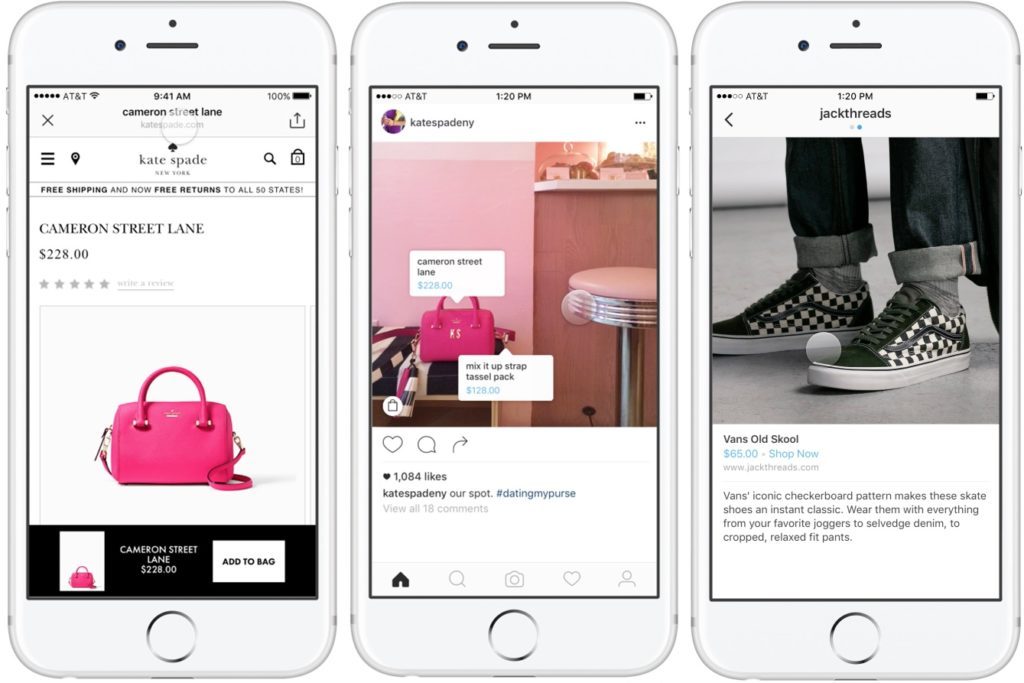
Sometimes when your mind is blank on what are the lack points of your social media strategy, it is quite useful to feel yourself in consumers’ shoes by going to your competitors’ pages. Point out the features you like and dislike about their account, which you would like to redo, and which one would be better to apply to your own account? Then make a short comparison of what are the strong and the lack sides of both your and competitors’, after what we strongly recommend to take a sheet of paper and write all these ideas, even the most unusual ones. 
instagram-shoppable-1024x683

  Image Source 

This list may become a huge booster for your improving strategy, so do not miss it!

4) Create Unique Content

One of the key points of the social strategy is to make enthralling and memorized content that will be catching the audience’s attention and help you to develop their interest in your product. Of course, it shouldn’t be too large and boring, so we recommend you to stick to the KISS principle (Keep It Short and Simple). Also, it is a great option to use some help from the Essay Writer Pro, so as to increase your content efficiency. 

According to Forbes, well-planned content is one of the keys to building successful strategies in social media, as in such a way you are more likely to meet all the requirements of your audience and establish a close connection with it. 

5) Promote Your Idea

However, it is now enough to make the points mentioned above, as it is also essential to make an effective promotion plan to make everything work out. That means you also have to mind the ads that can be applied to your business and how to operate it. For example, by knowing the preferences of your audience you can easily make a targeted ad on Facebook or Instagram because it is more likely to meet your consumer via advertising on social media. 
promote-your-link-and-product-to-1-millions-of-people

Image Source 

For instance, make a short video of your product, its benefits, or cases where it can be helpful so to present it to the potential consumer. It is discovered that over 30% of people would like to watch the videos of the product before thinking over its purchase. Thus, applying the video content to your social media ads can be also a good point to include in your strategy.

Conclusion

All in all, the social media strategy nowadays is an irregular tool which can greatly boost your business and stay competitive in any industry. Here we have presented the main reasons for creating your own strategy and added 5 efficient ways for you to include while making it. These methods can be applied to any social network so there is no need for worrying.

Without any doubt, we recommend you to create your social media development plan immediately and check its efficiency on your own. 

Our team wishes you good luck with it!

Alyse Falk

By

December 9, 2020

6 Social Media Contest Ideas to Engage Your Audience

December 9, 2020 | By | No Comments">No Comments

jason-leung-Xaanw0s0pMk-unsplash
How do you keep your audience engaged on social media? Running social media contests is a great way to boost your brand online and increase engagement. In fact, social media contests have the potential to generate thousands of entries and reach millions of people. We’ve gathered six social media contest ideas to help you keep your audience interested and engaged.

#1 Create an exciting hook
Your hook must be exciting and intriguing enough to get your audience on board. However, before you rush to choose your hook, it’s crucial to choose the prize first. The award can consist of a pre-paid vacation, a gift card, your product, or another brand-related product.
Now, as you’ve figured out the prize, let’s determine the hook for your contest. Some prizes will sell themselves. Who doesn’t want to go on a fully paid vacation to the Bahamas? In this case, the prize itself can be the hook.
If you can’t afford to send the lucky winners to the Bahamas, there are other ways to hook your audience. For example, you can hype up the exclusivity of the prizes. Award the winners with the best-selling products or with the items in their wishlist.

#2 Encourage user-generated content
Encouraging entrants to create branded content is one of the best ways to engage your audience. User-generated content (UGC) is any content (e.g. pictures, reviews, posts, videos, etc.) that has been created and posted by users on social media. For many brands, UGC is the primary method of engaging their audience. Not only does UGC engage your audience, but it also has an impact on purchase decisions. Additionally, UGC contributes to building trust and credibility as customers display your products in their online “testimonials.”

Rick-and-Morty-Design-Contest

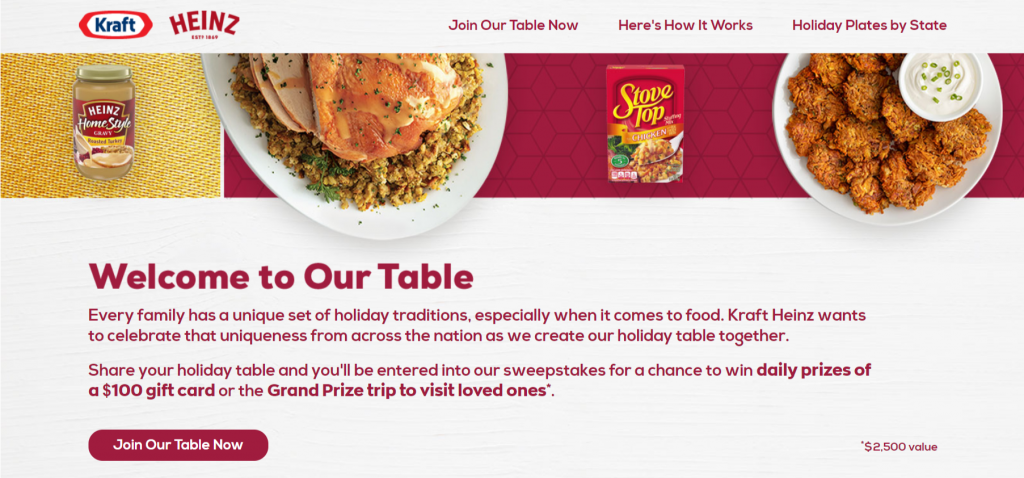
How to encourage UGC in social media contests? You can require entrants to post a picture of your product on their Instagram or Facebook story with a particular hashtag to participate in the contest. For example, the world-famous brand Heinz launched a competition with prizes. According to the rules, users must take a photo of their holiday tables, leave a request on the website or hashtag under the publication on Twitter or Instagram. Among the participants, there will be a drawing of certificates for $ 100 or a trip to visit relatives. In this way, Heinz has stimulated the generation and distribution of user-generated content.

Kraft-Heinz-Table-Sweepstakes

Important note: Always request permission before sharing UGC and credit the original content creator in the description.

#3 Put on a vote contest
Running a vote contest is another great way to boost user engagement on social media. Regardless of the size of your company and your budget, vote contests are easy to put on and can be used by all. Also, vote contests are a great way to show your followers that their opinion matters.
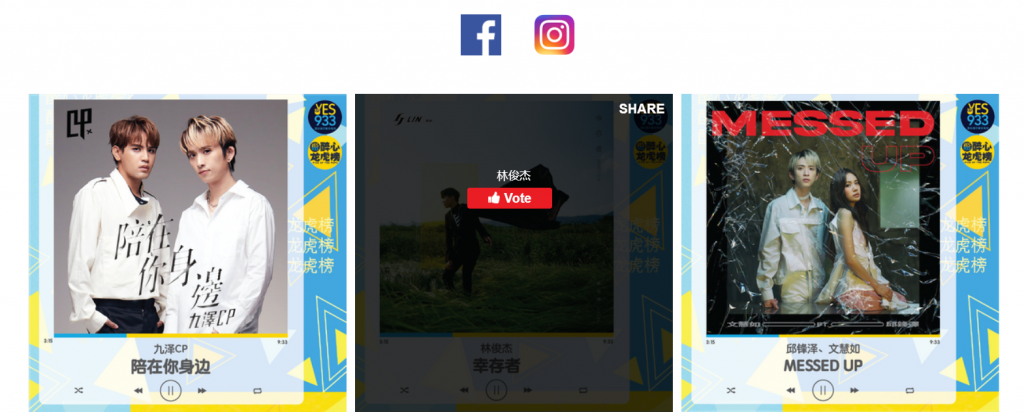
Provide your customers with more interactive opportunities as you post vote contests regularly. To increase engagement, make sure that the topic of the vote resonates with your audience. Vote contests that are fun and relate to audiences’ lifestyles are the best engagement boosters. For example, Mediacorp managed to put on a voting contest using Votigo customize contest platform.

Screenshot (43)

You can also set up a simple guessing game to engage your audience and award the contestant whose answer is correct. For example, you can post a picture featuring a bunch of your products and ask how many of a particular product your followers see. Don’t be afraid to get creative on this one. Try to create a guessing game that will grab your followers’ attention.
Additionally, you can ask for the email of your voters as they submit their responses. This will help you build up your mailing list and reach a wider audience with your email marketing campaign.

#4 Run a sweepstake
Sweepstakes is an easy and fast way to engage your Facebook followers. A sweepstake is a lottery that rewards a prize to a randomly selected winner. Your followers enter their personal info, including their email, and click ‘Enter Sweepstakes.’ Once they’ve entered the competition, your followers can share the post and invite others to participate.
Alternatively, you can ask your participants to come out with a creative comment, follow your Facebook account, or like the post. Professionals from Ivory Research, an essay writing services company, suggest that running sweepstakes are a great way to boost engagement rates and generate more leads as participants must interact with your page and share their email to enter the competition.
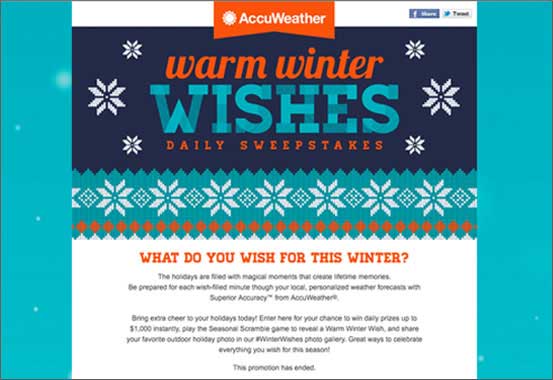
This AccuWeather sweepstakes campaign created by Votigo is a great example.

cntswps-rgtimg

#5 Run a daily prize contest
Running a daily prize contest is another effective way to keep your followers engaged and interested in your campaign. The main idea behind daily prize contests is that you have a series of prizes designated specifically for each day of the campaign. For example, you can give out your products to the winners of the sweepstake each day of the week.
Besides improved engagement rates, you’ll get a valuable insight on which products motivate contestants to participate more.

#6 Use contests to support a cause
Did you know that the majority of Americans are supporting socially responsible organizations? In fact, running a charity contest is an amazing way to keep your customers engaged. Use your social media contest to support a cause that aligns with your company’s values and social mission. For example, you can run a vote contest asking your participants to choose a non-profit for you to make a donation.

How to select a prize?
Now, let’s figure out how to select a prize worth participating in a contest. It’s best to have a prize that is somehow related to your industry or your product. For example, you can give out an exclusive gift card or some of your most popular products.
Many service providers fail to create social media contests as they can’t offer a tangible prize to the winner. If you’re a service provider struggling to come up with a prize, consider giving out your services.
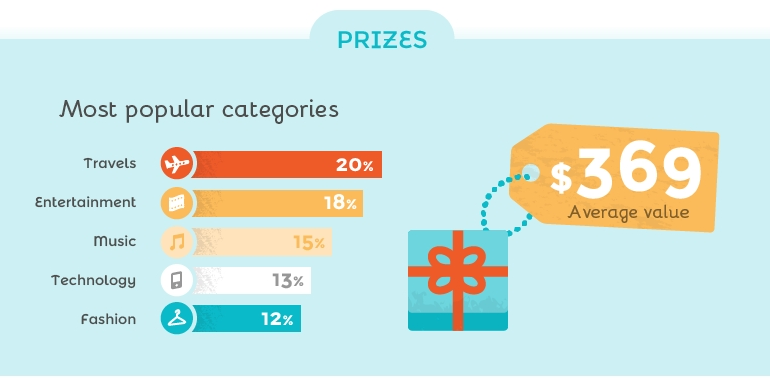
Here is another great example by Votigo of how you can offer products and coupons as a prize. Notice how they include multiple prizes.

6-Social-Media-Contest-Ideas-to-Engage-Your-Audience-Google-Docs
Conclusion
There are many ways you can employ contests to boost user engagement. Hopefully, this article has given you a better idea of the different types of social media contests.